09 August, 2026
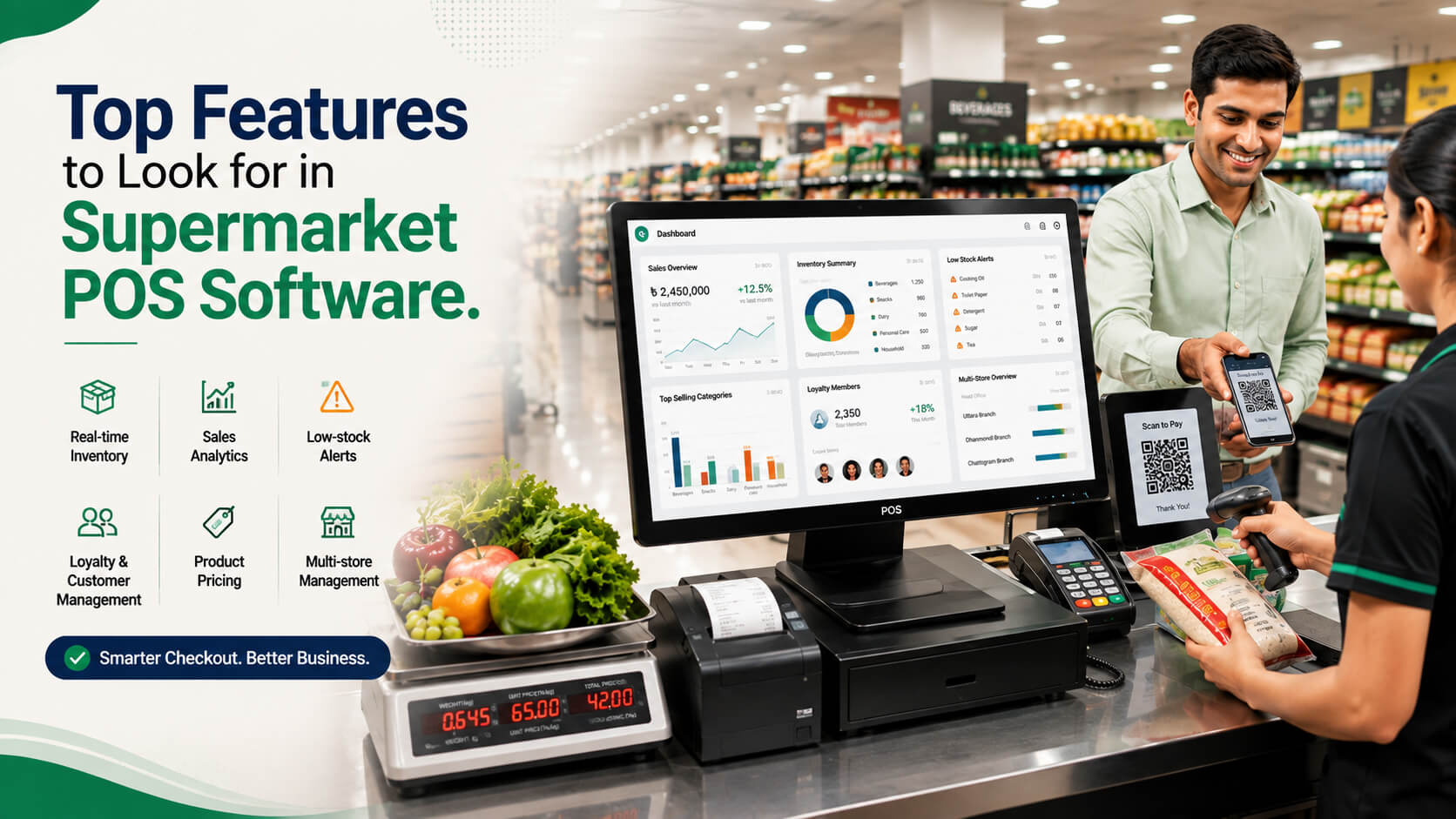
Top Features to Look for in Supermarket POS Software
Choosing the right POS software can make everyday supermarket operations much easier. This guide covers the key features to look for, from fast checkout and inventory tracking to barcode scanning, payments, loyalty programs, reporting, and multi-store management.
Running a supermarket involves much more than processing payments at a checkout counter. You need to manage thousands of products, frequent price changes, weighed items, promotions, stock movement, supplier purchases, customer loyalty, VAT records, multiple payment methods, and sometimes several branches all without slowing down the customer queue.
That is why choosing the right supermarket POS software requires a different approach from selecting a basic retail billing application.
A suitable system should connect checkout operations with inventory, purchasing, pricing, payments, reporting, and store management. For supermarkets in Bangladesh, you also need to consider local payment practices and applicable National Board of Revenue requirements.
This guide explains the supermarket POS features worth prioritizing, what to test before buying, and which common purchasing mistakes to avoid.
A good supermarket POS system should provide fast barcode checkout, real-time inventory management, weighing-scale integration, flexible pricing and promotions, VAT-ready invoicing, multiple payment options, loyalty management, expiry tracking, purchasing, analytics, employee controls, and multi-store management. It should also remain reliable during internet or connectivity problems and integrate with the hardware your supermarket uses. Supermarket POS software is a retail management system designed to process customer transactions while connecting checkout activity with inventory, pricing, purchasing, payments, customer management, and business reporting. Unlike a simple cash register or generic billing application, a POS system for supermarkets must handle high transaction volumes and complex product types. These can include packaged products with barcodes, loose produce sold by weight, promotional bundles, products with different VAT treatments, and stock distributed across multiple departments or branches. The strongest systems therefore work as both a checkout platform and a supermarket inventory management system. The following table provides a quick shortlist for buyers evaluating supermarket or grocery POS software. The exact priorities will depend on your supermarket's size. A single neighbourhood grocery store may not require sophisticated branch transfers, for example, while a growing chain should treat multi-location functionality as essential rather than optional. For most supermarkets, checkout speed should be one of the first features tested during a POS demonstration. A capable barcode scanning POS system should allow the cashier to scan standard retail barcodes rapidly, identify products without unnecessary prompts, change quantities easily, remove or void items according to permissions, and complete payment with as few steps as practical. Look for support for: Also consider future scanner compatibility. GS1's current retail guidance covers both traditional linear barcodes and an industry transition toward GS1-compliant 2D barcodes at point of sale. A supermarket buying new scanners and POS infrastructure should therefore ask whether the hardware and software can support newer barcode formats as requirements evolve. A feature-rich POS that creates delays after every scan can be worse operationally than a simpler system with an efficient checkout workflow. Ask the vendor to demonstrate the software under a realistic basket containing 20-30 mixed products rather than scanning only two test items. Strong POS inventory management automatically updates stock when products are sold, returned, received, damaged, transferred, or adjusted. This matters because supermarket inventory changes continuously. Managers need to know not simply what was purchased from suppliers, but what is actually available to sell. Useful inventory capabilities include: For supermarkets with a large catalogue, check whether products can be imported or updated in bulk using spreadsheets or integrations. Updating thousands of SKUs one by one is unnecessarily labour-intensive. The key question is: Does every important stock movement update the same inventory record? If sales, purchases, wastage and transfers live in separate disconnected modules, the stock figure displayed by the system may become difficult to trust. A POS system with weighing scale integration is particularly useful for supermarkets selling fruits, vegetables, meat, fish, spices, rice or other products by weight. The ideal workflow is straightforward: Before purchasing, test the exact weighing-scale models you plan to use. "Scale compatible" is not specific enough; compatibility can depend on the manufacturer's interface, communication protocol, label format and hardware configuration. If weighing is central to your business, request a live demonstration using the actual or equivalent hardware. Supermarkets change prices frequently and often run several promotions simultaneously. The POS should allow these rules to be configured centrally instead of requiring cashiers to calculate discounts manually. Useful promotion features include: The system should also define how overlapping promotions behave. For example, if a product already has a promotional price and a customer receives a loyalty discount, does the customer receive both discounts or only the best available offer? That rule should be controlled by the software not decided differently by individual cashiers. For supermarkets in Bangladesh, tax and fiscal requirements deserve specific attention during procurement. The National Board of Revenue provides VAT services including eBIN, iVAS, VAT e-filing and related digital services. NBR guidance also identifies VAT-6.3 as the tax invoice relevant to supplies in applicable circumstances. NBR also published an urgent notice on 18 May 2025 concerning the use of EFD/SDC/PKI POS software by VAT-registered establishments. The precise requirements applicable to an individual supermarket can depend on its registration, business category and current NBR rules. Therefore, ask prospective vendors: Compliance requirements can change. Verify the latest requirements directly with NBR or a qualified Bangladesh VAT adviser before deployment rather than relying solely on a software vendor's sales claim. A supermarket in Bangladesh should be able to accommodate the payment methods its customers actually use. Depending on your acquiring arrangements and business requirements, that may include: Bangladesh Bank defines Bangla QR as the national interoperable QR standard for retail payments. Its framework supports payment instruments including bank accounts, debit and credit cards, prepaid cards, mobile financial service accounts and e-wallets. Bangladesh Bank also states that its TakaPay domestic card scheme supports POS and QR transactions. Integration matters because a payment should ideally be connected to the POS transaction rather than manually recorded after confirmation on another device. That reduces cashier work and makes reconciliation easier. For supermarkets with frequent repeat customers, supermarket loyalty program software can be valuable when it is integrated directly into checkout. Look for functionality such as: Avoid collecting customer information simply because the software allows it. Define what information you genuinely need, control employee access, and establish appropriate privacy and data-retention practices. A loyalty programme is most useful when it produces a clear customer benefit and remains simple enough for cashiers to operate during busy periods. Expiry management can be important for supermarkets selling perishable foods and other date-sensitive goods. Useful functionality can include: Not every packaged grocery store needs detailed batch tracking at checkout. Assess the level of control according to your product mix. For businesses with significant fresh, chilled or short-life inventory, however, expiry and wastage visibility should be evaluated as a core requirement rather than an optional report. A supermarket POS becomes more useful when sales information feeds into purchasing decisions. Look for: Consider a product that sells faster than expected after a promotion. A connected system can show falling inventory and help the purchasing team identify what needs replenishment. A disconnected billing system may show that the item sold but still leave staff checking shelves or separate spreadsheets to decide what to reorder. If you operate more than one branch or expect to expand a multi-store POS system can prevent considerable administrative duplication. It should ideally provide: Ask how quickly branch transactions synchronize with head office. Also test what happens if one location temporarily loses connectivity. A system designed around perfect internet availability may create operational problems at the checkout counter. Good reporting should help managers answer specific operational questions rather than simply generate dozens of spreadsheets. Important reports may include: Role-based access is equally important. A cashier may need permission to process normal sales but not change product costs. A supervisor may approve discounts and voids. A store manager may view reports, while system administrators control configuration. Look for an audit trail showing who performed a sensitive action and when. Reliability is a feature. Ask what happens when: If offline sales are supported, determine exactly which functions remain available and how transactions synchronize afterward. Also review: A long feature list means little if the vendor cannot keep your checkout operation running reliably. Consider an illustrative supermarket business in Dhaka with three branches, several checkout counters, packaged groceries, fresh produce and regular promotional campaigns. Its priorities might look like this: In this case, selecting the cheapest billing software would probably be a false economy. The purchasing decision should focus on how well the system connects these workflows. Use this seven-step process. Document checkout, purchasing, receiving, inventory counting, weighing, returns, promotions, payments and reporting. A weighing-scale connection may be mandatory; an advanced marketing module may not be. Give the vendor realistic scenarios instead of allowing a generic sales presentation. Confirm current NBR requirements applicable to your business and ensure the proposed setup can satisfy them. Test scanners, scales, receipt printers, cash drawers, payment devices and offline behaviour. Include software subscriptions or licences, checkout hardware, installation, training, integrations, upgrades, support and additional branch costs. Where practical, test the software at one counter or branch before migrating an entire supermarket operation. Key takeaway: Buy based on proven workflows, not the number of features shown on a brochure. Basic invoicing may work initially but become restrictive when the business needs purchasing, stock transfers, weighted products or multiple branches. Never assume a scanner, weighing scale or receipt printer will work because it uses a familiar connector. Test exact models. A low upfront cost can be offset by expensive support, extra-user fees, hardware requirements or missing integrations. Ask the vendor to simulate an internet outage during the demonstration. Use role-based permissions for discounts, returns, voids, price changes and reports. Before switching systems, determine how products, barcodes, stock balances, suppliers and customer records will be transferred. Ask the vendor to demonstrate exactly how its implementation addresses the requirements applicable to your business, and independently verify current rules. A few procurement practices can make vendor comparisons much easier: The best grocery store POS system is not necessarily the one with the most modules. It is the system that handles your critical workflows accurately, quickly and reliably without creating unnecessary complexity for staff. Fast, accurate checkout connected to inventory is the foundation. Every completed sale should update the relevant stock record while allowing the cashier to scan products and accept payment efficiently. From there, supermarkets should prioritize weighing-scale support, promotions, purchasing, reporting, tax requirements and payment integrations according to their operating model. Grocery POS software typically needs stronger support for high-volume checkout, weighed goods, perishables, frequent pricing changes and large product catalogues. A clothing or specialty-retail POS may not require weighing-scale integration, expiry management or complex grocery promotions. Supermarkets should therefore test grocery-specific workflows rather than assuming any retail POS will be suitable. Yes, if the store regularly sells products by weight. Integrated weighing can reduce manual calculation and pricing errors for products such as produce, meat or bulk goods. However, compatibility should be confirmed with the exact scale or label-printing equipment being used rather than relying on a vendor's general statement that scales are supported. Some systems can continue selected operations offline, but capabilities vary significantly. A system may allow cash sales while temporarily disabling synchronized inventory, customer lookup or digital-payment functions. Before buying, disconnect the test system from the internet and ask the vendor to demonstrate exactly what works, what stops and how data synchronizes after connectivity returns. At minimum, support should reflect the supermarket's actual customer payment mix, including cash and relevant electronic options. Depending on merchant arrangements, this may include cards, mobile financial services and QR payments. Bangladesh Bank's Bangla QR framework enables interoperable retail QR payments across supported financial instruments, making QR integration worth considering. There is no single meaningful price because the total depends on counters, branches, hardware, integrations, support and licensing structure. Compare total cost over several years rather than software price alone. Ask each vendor to itemize POS terminals, scanners, scales, printers, installation, data migration, training, upgrades, support and future branch expansion. Neither architecture is automatically better for every supermarket. Cloud systems can simplify centralized access and multi-branch management, while local or hybrid designs may offer different approaches to connectivity and infrastructure control. Evaluate availability, offline behaviour, security, backup, support and integration requirements rather than choosing based solely on whether the vendor labels its system "cloud." Yes, if the software includes batch or expiry-management functionality. This can help identify products approaching expiration, record wastage and improve stock rotation. However, detailed batch tracking adds operational work, so configure it where the benefit justifies the process particularly for fresh, chilled, pharmaceutical or other date-sensitive inventory. Choosing supermarket POS software is ultimately an operational decision, not simply a software purchase. The strongest system should make checkout faster while giving management dependable control over inventory, pricing, purchases, payments, promotions, employees and reporting. For supermarkets in Bangladesh, local VAT requirements, digital payment compatibility and vendor support should also be evaluated carefully. Start by mapping how your stores actually operate. Build a shortlist of non-negotiable requirements, then make each vendor demonstrate those workflows with realistic products, promotions, hardware and payment scenarios. When the POS matches the realities of the supermarket floor as well as the needs of management, it can become the central operating system for the retail business rather than just another billing application.What Features Should Supermarket POS Software Have?
What Is Supermarket POS Software?
Which Supermarket POS Features Matter Most?
Feature
Why It Matters
What to Test
Fast barcode checkout
Reduces cashier steps and queues
Scan speed, product lookup, quantity entry
Real-time inventory
Improves stock visibility
Stock deduction, adjustments, transfers
Weighing-scale integration
Supports fresh produce and bulk items
Weight-to-price calculation and PLU handling
Pricing and promotions
Handles frequent retail offers
Bundles, discounts, scheduled prices
VAT and invoice support
Helps maintain appropriate sales records
Tax configuration and invoice format
Multiple payment methods
Gives customers payment flexibility
Cash, cards, QR and supported digital payments
Loyalty management
Encourages repeat purchasing
Points, member pricing and redemption rules
Expiry and batch tracking
Supports perishable inventory control
Expiry alerts and batch-level stock
Purchasing and suppliers
Improves replenishment
Purchase orders and receiving
Multi-store management
Centralizes branch operations
Branch stock, pricing and transfers
Reporting and controls
Improves decision-making
Margin, cashier and stock reports
Offline/reliability features
Reduces disruption
Internet-loss and recovery testing
How Important Is Fast Barcode Scanning at Checkout?
Does the POS Include Real-Time Inventory Management?
Does the POS System Support Weighing Scales?
Can It Handle Complex Prices, Discounts and Promotions?
Does the Software Support Bangladesh VAT Requirements?
Which Payment Methods Should a Supermarket POS Support?
Should the POS Include Loyalty and Customer Management?
Can It Track Expiry Dates, Batches and Wastage?
Does the System Manage Suppliers and Purchasing?
Do You Need a Multi-Store POS System?
What Reports and Employee Controls Should You Expect?
How Reliable, Secure and Integratable Is the Software?
Practical Example: Choosing a POS for a Growing Supermarket
How Should You Evaluate Supermarket POS Software Before Buying?
1. Map Your Store Workflows
2. Separate Must-Haves From Nice-to-Haves
3. Request a Workflow-Based Demo
4. Verify Bangladesh Compliance Requirements
5. Test Hardware and Connectivity
6. Calculate Total Cost of Ownership
7. Pilot Before Full Rollout
Common Mistakes When Choosing a Grocery Store POS System
Choosing Generic Billing Software
Ignoring Hardware Compatibility
Focusing Only on the Purchase Price
Not Testing Offline Operation
Giving Every Employee Full Access
Neglecting Data Migration
Assuming "VAT Ready" Means Fully Compliant
Expert Tips for Selecting Supermarket POS Software
Frequently Asked Questions
What is the most important feature of supermarket POS software?
How is grocery POS software different from a normal retail POS?
Does a supermarket POS need weighing-scale integration?
Can supermarket POS software work without the internet?
What payment methods should a supermarket POS support in Bangladesh?
How much does supermarket POS software cost?
Is cloud-based or on-premise POS better for supermarkets?
Can a supermarket POS manage expiry dates?
Conclusion